Membership Billing That Collects Itself
Recurring Stripe subscriptions, invoices, emailed receipts and a live balance for every student. Chase late payers with one click instead of one phone call at a time.
Flat $89 USD/month. No per-student or per-transaction fees from us.
Everything Between the Sign-Up and the Bank
Stripe or manual, one student or a whole family, the same invoices, balances and receipts.
Stripe subscriptions in one click
Create a recurring membership from the student profile. Two-way sync keeps packages, prices and Stripe products identical, and duplicate subscriptions are detected before they bill twice.
Invoices and receipts, printable
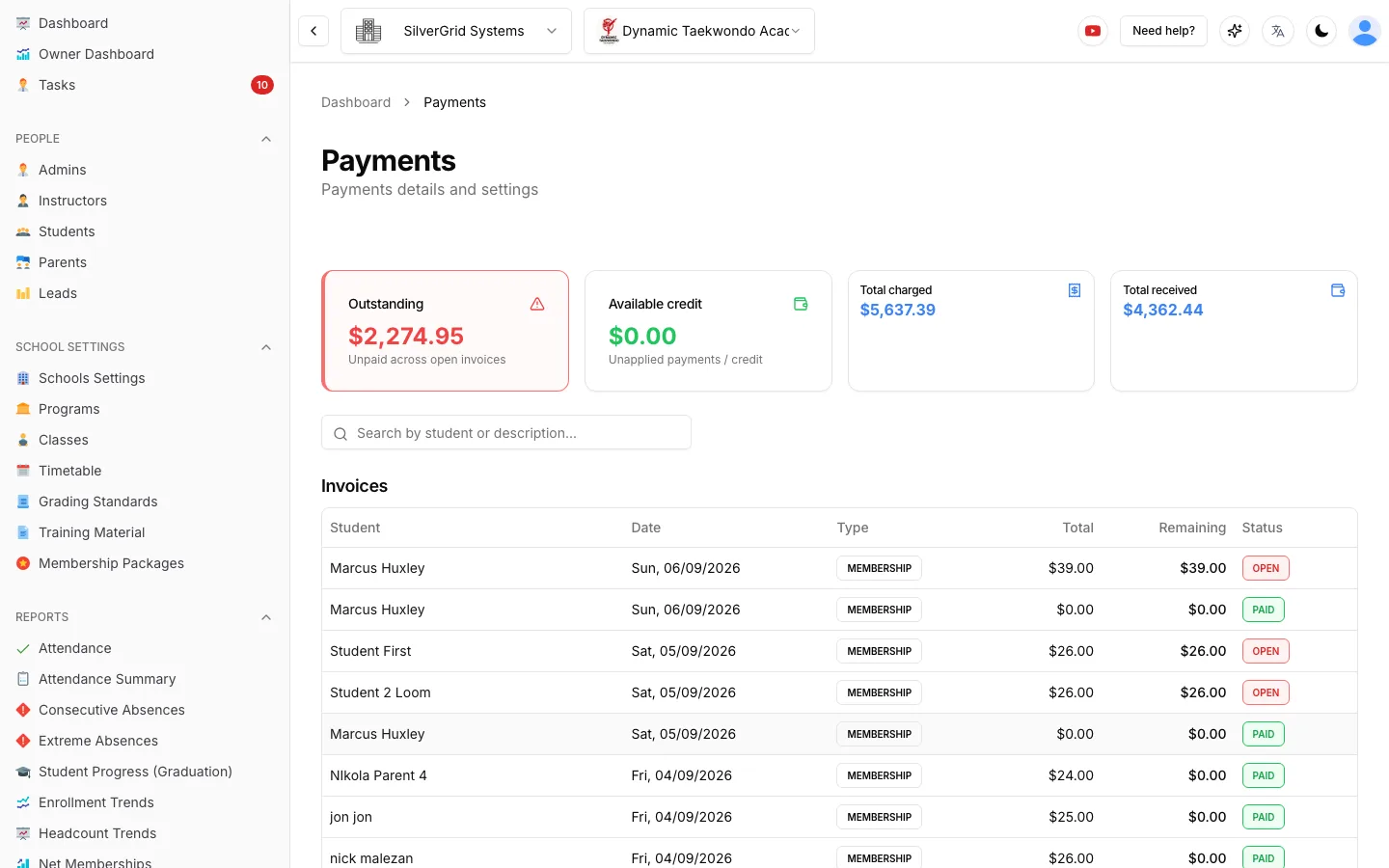
Every charge becomes an invoice with status, date filters and a detail view. Print an invoice or receipt, edit or void it, and refund a Stripe payment straight from the payment row.
Manual payments welcome
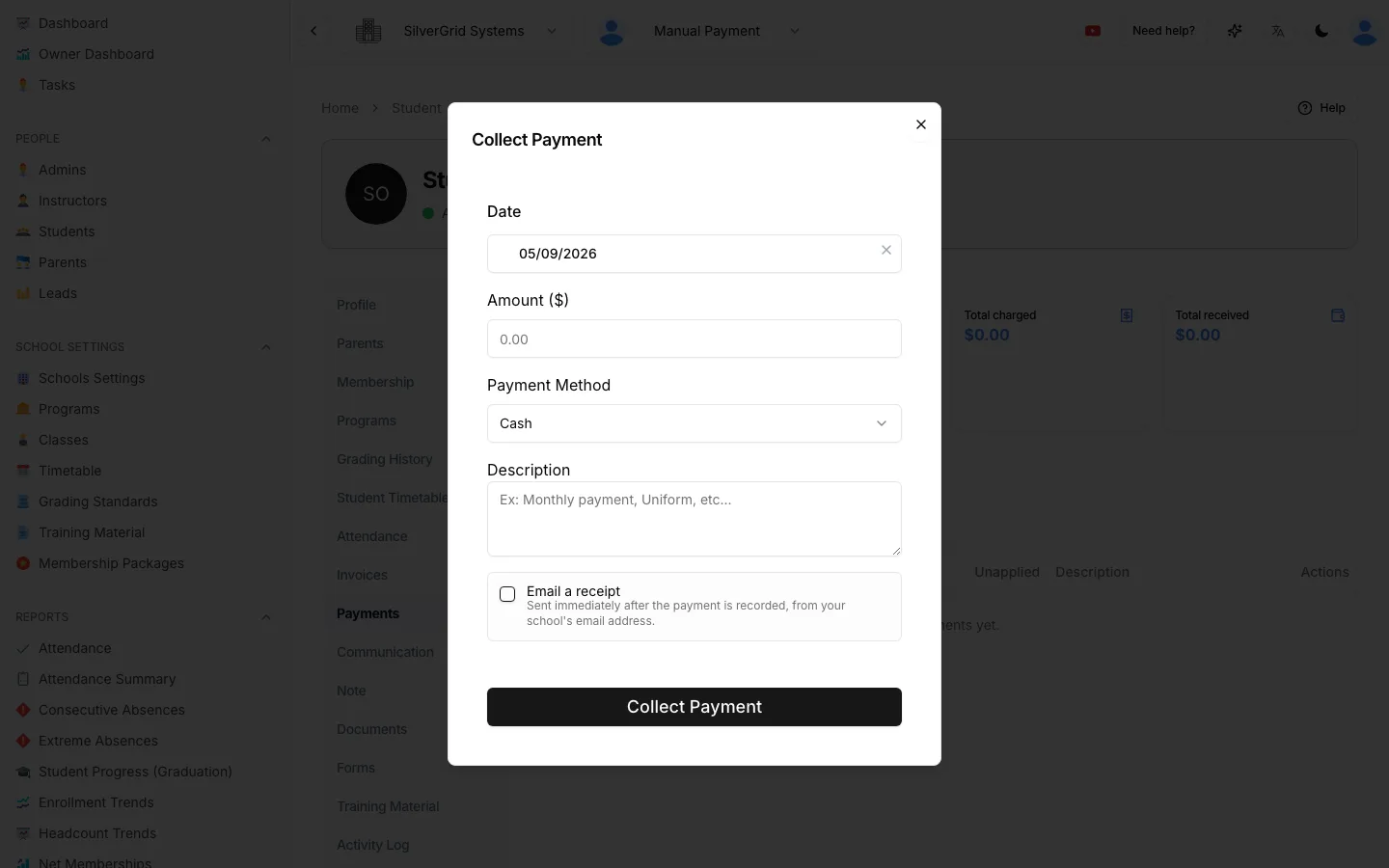
Cash, bank transfer or terminal? Collect Payment records it in seconds, applies it to the oldest open invoice first and can email a receipt from your school address the moment it is saved.
Per-student rates and custom plans
Give a family a special rate or build a one-off subscription for a single student without cloning packages. Start dates can be back-dated and the missed transactions are created for you.
Cards saved before the membership
Send a payment-profile link so a parent stores a card safely with Stripe first. Choosing a membership later creates the subscription instantly, with no second form to fill in.
Leads pay online
A membership offer link lets a lead pick a package, pay and become a student on the spot. Public registration can continue straight into payment, and staff get a task for every purchase.
One Profile, the Whole Money Story
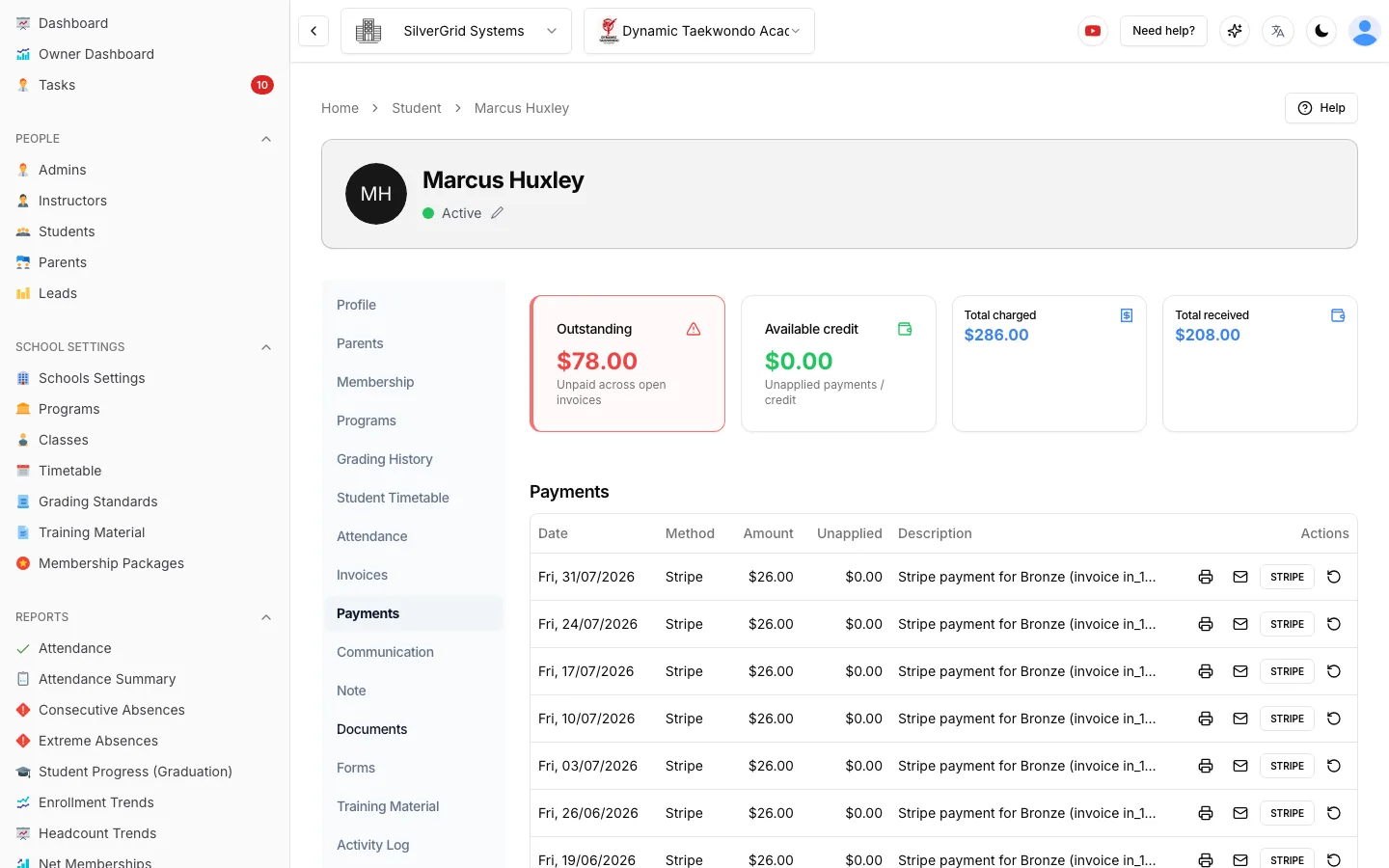
Invoices and Payments each get their own tab on the student profile. Outstanding, available credit, total charged and total received sit at the top so a front-desk question is answered in a glance.
- Filter invoices by date and status, open the detail view, print or void
- Refund a Stripe payment from its row, with the refund mirrored on the invoice
- Add a fee, discount or surcharge without leaving the profile
- Re-send the receipt for any past payment to the student or their parents
- Change the card on a Stripe subscription in place
Cash at the Desk, Receipt in the Inbox
Not every school wants cards on file. Collect Payment records cash, bank transfer or terminal payments, applies them to the oldest outstanding invoice first and keeps any remainder as credit.
Tick Email a receipt and the student or parents receive the amount, date, method and description the moment the payment is saved, sent from your school's own email address.
Payment Reminders Without the Awkward Call
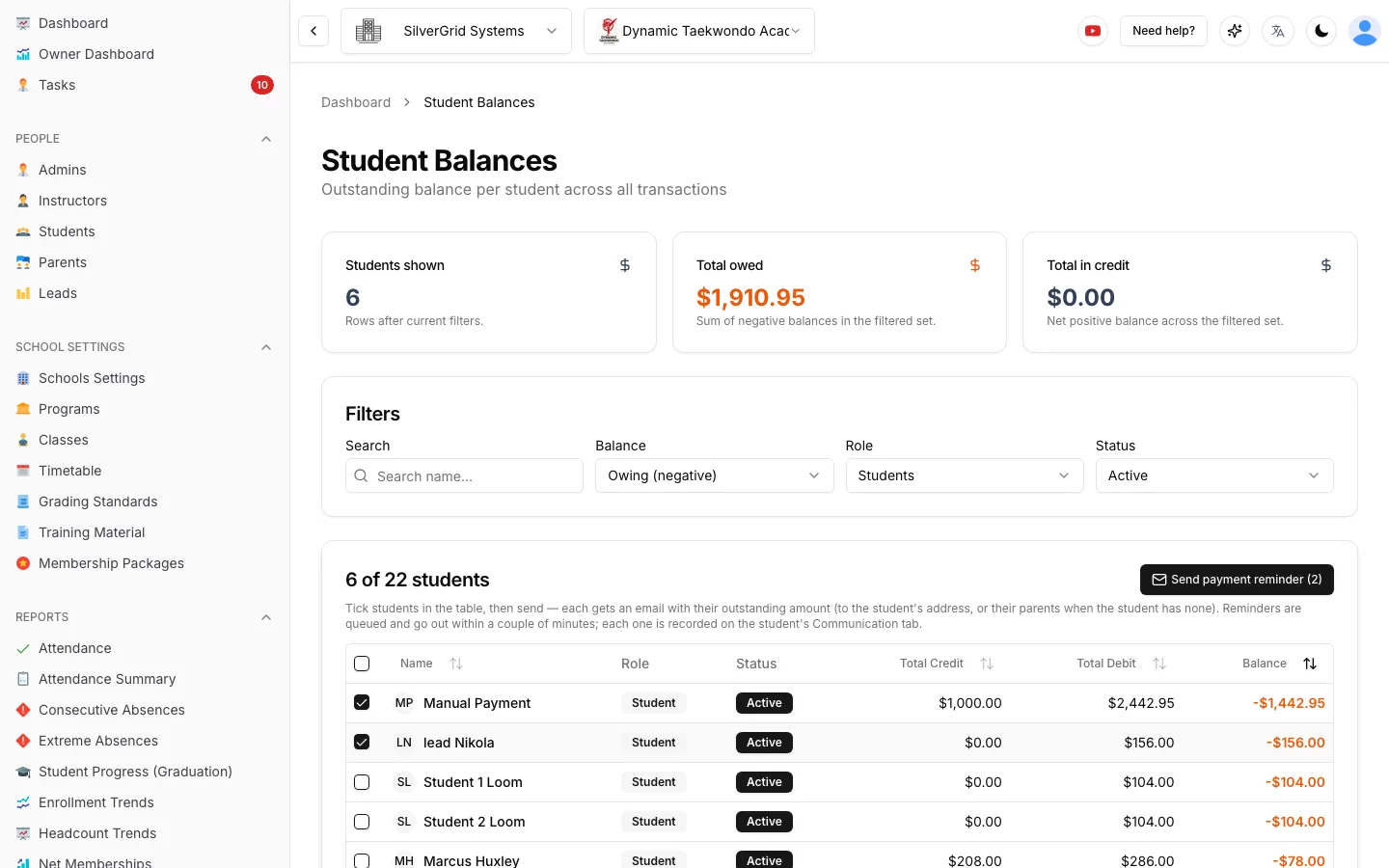
The Student Balances report shows exactly who owes what. Tick the names, press Send payment reminder, and each family gets an email with their own outstanding amount.
- Reminders go to parents when the student has no email
- Balances are re-checked at send time, so recent payers are skipped
- Every reminder is logged on the profile Activity Log
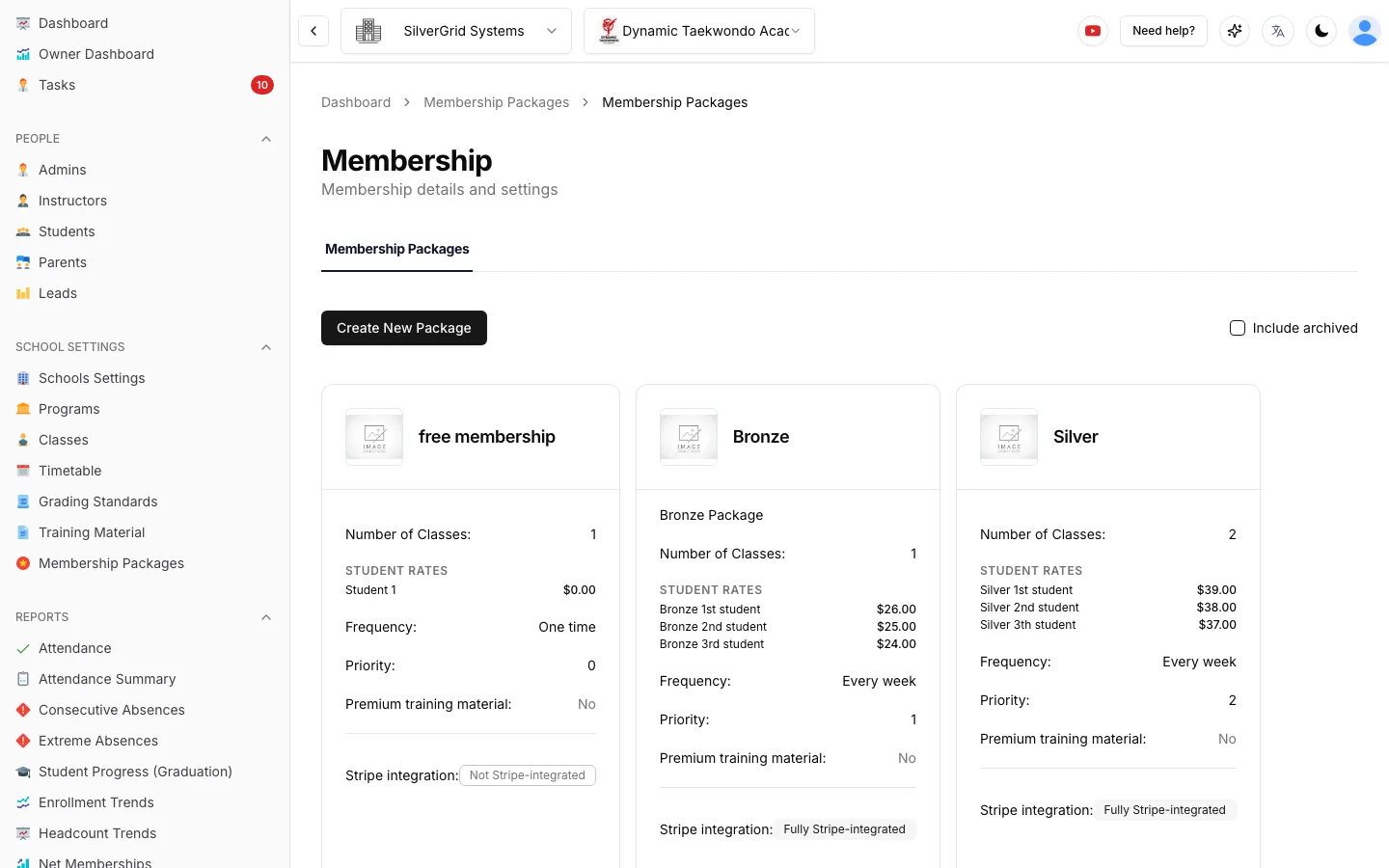
Packages That Stay in Sync With Stripe
Build membership packages once. Prices, intervals and class allowances sync both ways with Stripe products, and archiving a package retires it cleanly without touching existing subscribers.
- Choose which packages appear on the public registration form
- Shareable registration links that pre-select a membership
- Premium training material can be gated behind a package
- Backdatable start dates, holds and quit dates for accurate billing history
Billing Questions, Answered
Do I need Stripe to use billing in Sport School Manager?+
No. Each school chooses its payment method. Connect Stripe for automatic recurring subscriptions and card payments, or run manual billing where staff record cash, bank transfer and EFTPOS payments with Collect Payment. Both modes share the same invoices, balances and receipts.
Can a student pay before they have a membership?+
Yes. Send a payment-profile link and the student or parent saves a card securely with Stripe. When they pick a membership later, the subscription is created instantly with the saved card. Leads can also choose and pay for a membership online through a membership offer link.
How do payment reminders work?+
Open the Student Balances report, tick the students who owe money and press Send payment reminder. Each student receives an email showing their own outstanding amount. If the student has no email address the reminder goes to their parents. Balances are re-checked at send time so nobody who has just paid gets chased.
Are there transaction or per-student fees?+
Sport School Manager charges one flat fee of $89 USD per month for unlimited students, and it is free for schools with up to 20 students. Stripe charges its own standard card-processing fees directly; we add nothing on top.
Billing setup guides in the Help Center
Step-by-step guides with screenshots, written for school owners and admins.
- CompanyLocalization: timezone, currency, date and time formatsSet each school’s currency, time zone and display formats.(opens in a new tab)
- Owner DashboardOwner Dashboard: what each number means, and exporting to ExcelDefinitions for every metric plus CSV and Excel export.(opens in a new tab)
- Getting StartedHow to register an account (Company Owner)Create your company, first school and owner login in a few minutes.(opens in a new tab)
Stop Chasing Payments by Hand
Free for up to 20 students. 90-day free trial for larger schools, then $89 USD/month flat.